
If you’ve ever wondered how to make your own smart roller blinds without spending a fortune, you’re not alone. The good news is you can build a set for under $15 per window, saving hundreds compared to store-bought options.
By following some simple steps for measuring, cutting, and wiring, you’ll be able to create automated blinds that work seamlessly with your Wi-Fi.
Stay tuned for the full process ahead.
Why DIY Smart Blinds Saves Money and Teaches You Skills
Building your own smart blinds can cost under $15 per window, a significant saving compared to store-bought options that often run into hundreds of dollars. This DIY approach reduces expenses while giving you hands-on experience in electronics, automation, and fabrication. You’ll learn to solder circuit boards, configure microcontrollers like NodeMCU, and integrate your system with platforms such as Home Assistant.
Creating your own smart blinds also provides unmatched customization. You can tailor automation to suit your daily routine, whether that means closing shades at night or opening them in the morning, ensuring your smart home operates exactly as you want. Additionally, by learnings skills like motor calibration and Matter-compatible pairing, you develop a capable home automation system that not only saves money but also enhances your understanding of how smart devices work together. For instance, these automations can reduce energy costs by blocking heat and UV rays, similar to how premium brands prevent sun glare and protect furniture. If you are torn between using your space for work or beauty, consider that a vanity or desk serves a distinct purpose based on your priorities. Notably, persistent flickering in some smart setups may actually stem from voltage irregularities that mimic LED bulb problems and require a different electrical fix. To keep your project affordable, consider using budget-friendly materials like reclaimed wood or affordable metal rods for mounting.
Measure Your Window and Cut the Blind Fabric for Smart Blinds
To measure your window accurately before cutting the fabric, use a metal tape measure and record your dimensions to the nearest 1/8 inch. Round the width down and the height up to the closest 1/16 or 1/32 inch to ensure a precise fit. For inside mounts, measure the width at the top only, recording the smallest width to avoid gaps. Measure the height at the left, middle, and right sides, noting the longest measurement to achieve full coverage. For outside mounts, add 3 inches to both the width and height measurements to allow for proper light control and at least a 3/4 inch overlap on each side. Always record measurements immediately with a pencil and paper to prevent costly errors. Prioritize fabric material durability, choosing sturdy fabrics that can withstand repeated operation and ease of mounting. Considering solar shades can enhance your home decor by filtering light while maintaining privacy. Additionally, for an inside recess fit, use the smallest measurements at three points across the top, middle, and bottom of the recess for consistency. For optimal energy efficiency, consider choosing LED bulb types that match your desired brightness and color temperature.
Cut the EMT Pipe to Fit Your Blind Fabric
To cut the EMT pipe to match your blind’s length, follow these steps: First, measure your window and determine the desired pipe length. Use a tubing cutter for a clean, square cut. Mark the cut line with a Sharpie, then wrap painter’s tape around the pipe along your mark to guide your blade. Align the cutter’s wheel with the mark and tighten the knob slightly. Rotate the cutter around the pipe a few times, then tighten a little more. Continue this process until you are about 90% through the pipe, then snap it apart. A tubing cutter is the best method because it produces clean cuts and includes a deburring feature. Additionally, ensuring the pipe fits securely in your ceiling can help with proper alignment for a professional finish.
Secure the pipe in a vise to keep it steady during the cutting process. Afterward, use a deburring tool or a file to remove any inside lip or sharp edges. This step ensures a smooth finish, making it easier to add conduit connectors or pipe insulation later. With careful execution, cutting your EMT pipe to size takes less than two minutes and results in a clean, accurate fit for your blind’s frame.

VERSATILE APPLICATION: Constant swing tubing cutter cuts from 1/8-Inch to 1 3/8-Inch (3 to 34 mm) O.D. aluminum and copper tubing

This powerful tube cutter is specially designed for quick cutting of copper, brass, aluminum, plastic, or other thin tubes. In addition, fold-away reamer stored in frame allows for easier removal of burrs

Easily executes clean, square cuts on copper, brass, aluminum and thin-wall steel
Match Your Motor to the Smart Blind Tube Diameter
To match your motor to the smart blind tube diameter, you need to measure both the inner and outer diameters of your blind tube precisely. Use a digital caliper or ruler for accurate readings—avoid guessing. Most retrofit motors are compatible with tubes measuring 20 mm, 25 mm, 28 mm, or 38 mm in diameter. For example, Zemismart motors fit inner diameters of 17 mm, 25 mm, or 28 mm, while Blindsmart units require a tube diameter of 36–38 mm. A larger 38 mm tube pairs well with high-torque motors like the Rollerhouses 25TEW, which can handle blinds up to 12 pounds. For a successful installation, ensure you follow the dimmer switch wiring guidelines from the knowledge base to avoid electrical issues. When securing your setup, consider using closet wire shelves techniques for sturdy bracket mounting. Regularly dusting the fabric surface can prevent debris from interfering with the motor mechanism.
Motor tube compatibility also depends on your crown and drive adapters, which must match the grooves inside your tube. If your tube wall thickness is under 1 mm, replace it before proceeding. Mismatched sizes cause slipping or stalling during operation, so double-check your measurements now to ensure proper fit and function.

50Nm High Torque for Heavy-Duty Awnings--Built with 50Nm high torque, this retractable awning motor easily powers large patio awnings, outdoor blinds, and shutters. The robust motor delivers smooth, reliable operation even under heavy wind and weather conditions, perfect for residential and commercial use.

What is this? This is an adapter for roller blinds brackets. When you find that the motor and your bracket do not match when installing the roller shutter motor, and you do not want to replace the bracket, you can use this adapter.

This is the AM25 Motor replacement drive crown and rubber wheel, suitable only for the AM25 motor. Due to the special design of the central shaft, it is not compatible with other motors.
Attach the Motor to the Tube and Test-Fit the Assembly
To properly attach the motor, remove the end cap to access the interior of the tube. Slide the motor into place, making sure the rubber drive slot aligns with the groove inside the tube for a secure fit. Next, align the drive adapter with the tube’s internal ribs to ensure it engages correctly. Insert the motor until about one-third of the tube remains visible. Then, attach the drive adapter onto the motor’s shaft, matching the rubber drive crown’s slots to the tube groove on the opposite side. Secure the drive with a metal clip, ensuring it clicks into place. Confirm that the teeth on the drive wheel face back toward the motor to ensure correct orientation. Push the motor fully into the tube and reassemble the inner end cap to secure everything. When inserting the motor, note that the motor’s fitting aligns with the metal tube almost perfectly for a secure connection. For a polished final look, consider how curtain ring hardware can provide a smoothly gliding support for your roller blind fabric. The best hangers for joists often use heavy-gauge steel for maximum strength and reliability in supporting structural loads. For a safer installation, remember that cordless blinds eliminate the risk of dangling cords.
Finally, test-fit the entire assembly by verifying that the fabric roll stays centered and all components align properly. This step helps prevent operational issues and ensures the assembly looks neat and functions smoothly.

Perfect AM25 Compatibility: Specifically engineered as a replacement drive crown and rubber drive roller for the AM25 electric roller shade motor — ensures snug fit and reliable torque transfer for seamless operation.

【Pure Wired, No WiFi 】 This is a wired-only 12V DC smart motor with no WiFi module. Designed for stable, network-free applications. Requires a 12V DC power adapter (Sold Separately). Not compatible with AA batteries or manual wands.
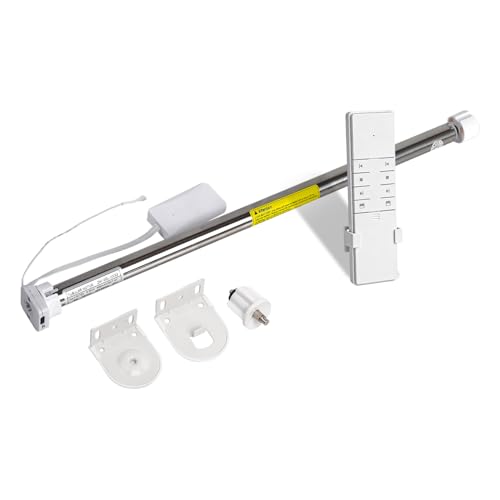
Smart Zigbee motor: Built-in battery, equipped with USB port, it can be charged by phone charging cable or power bank directly, and work for about 3 months for a time, so you don't have to worry about your motor out of power
Install the Mounting Brackets With Perfect Alignment
To install the mounting brackets with perfect alignment, start by marking their positions accurately. Position the motor bracket 100mm from the window edge and 20mm down from the ceiling. Ensure the outer edge extends 1 3/8 inches wider than the fabric width for proper coverage. Measure inward 2 to 4 inches from each top corner for the bracket placements. Draw a level line across the wall from the first mark to serve as a guide for the second bracket, helping maintain straightness. Use a spirit level on each bracket after mounting to verify they are perfectly horizontal. Pre-drill holes with a 5/64-inch bit, then secure the brackets through the top two holes. Once tightened, double-check that the brackets are square by re-leveling them to prevent any shifting. Using a hammer if necessary helps fully seat the wall plugs into the drilled holes for secure bracket placement. Finally, route the cable 77mm from the bracket’s side edge, keeping it clear of the fabric for a clean installation. For a stronger hold, you may also consider predrilling into wall studs to anchor the brackets securely.

Strong Support: The window shade brackets can easily fix the pulley track, ensuring the normal operation of the roller blind and preventing effectively the roller blind from falling off or loosening.

【Extensive compatibility】 The cordless crank kits are replacement parts for sunshade curtains, compatible with a wide range of different outdoor sunshade

Strong Support: The window shade brackets can easily fix the pulley track, ensuring the normal operation of the roller blind and preventing effectively the roller blind from falling off or loosening.
Wire the Controller and Connect the Motor
After mounting the brackets, you’ll wire the controller and connect the motor to operate your blinds. Start by ensuring you have a dedicated 12-volt power supply capable of providing sufficient current for multiple motors if needed. Connect the 5V and 12V lines separately to the stepper drivers, using twisted pair cables for the 12V line to reduce electrical interference.
Wire the motor wires to the center Common connector of each relay. Then, connect the 12V supply to the Normally Open (NO) outputs and GND to the Normally Closed (NC) outputs. For the NodeMCU, assign pins D1 to IN1, D2 to IN3, D3 to IN2, and D5 to IN4 to control the ULN2003 driver. Use a heat gun or hair dryer to soften any adhesive residue that may be present. When attaching the motor and controller to the enclosure, consider using adhesive backing on the stepper drivers to secure them without screws.
Use CAT 5 cable for signal inputs, stripping 3 to 5 millimeters of insulation and crimping DuPont connectors facing downward for secure connections. After completing the wiring, calibrate the sensors by pressing the calibration button once the blind is at its starting position. Then, set the limits with micro-adjustments, ensuring the blinds move correctly within their range. Make sure to measure the distance from the ceiling as you would when hanging a curtain rod to ensure proper alignment. Finally, configure pulsetime relay commands to prevent over-rotation, avoiding motors from turning excessively and damaging the system. Use a single-channel wall controller to manually set high and low limits before connecting the automation relays.
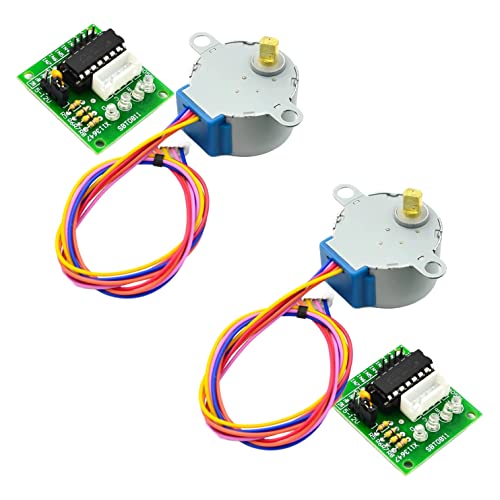
28BYJ-48 12V STEPPER MOTOR: Includes 5 wire unipolar 28BYJ-48 stepper motor designed for stable and precise motion control applications

1 Axis Stepper CNC Kit 2.4Nm(339.87oz.in) Nema 23 4A Stepper Motor & Driver 1.0-4.2A 24-50VDC DM542TE
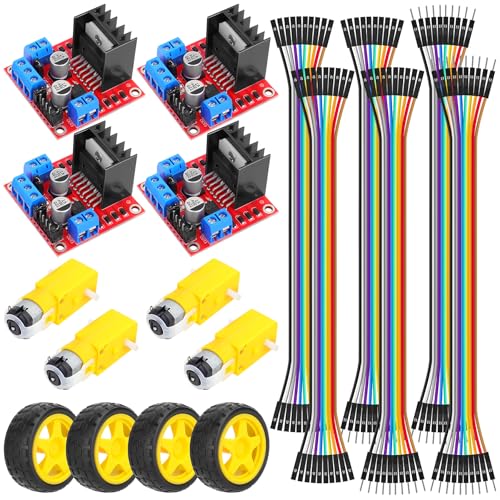
RC Automotive Project Parts Package: It not only comes with 4 wheels and motors, but also 2 motor drive modules and 60 jumper wires, which are very useful accessories for your project. If using an Arduino, write a simple program to control the motors using PWM signals. This will let you set the speed of the motors and change their direction
Pair the DUALR2 Module With the eWeLink App
To pair the DUALR2 module with the eWeLink app, begin by ensuring your device is connected to a 2.4 GHz Wi-Fi network, as the module does not support 5 GHz. When following the pairing steps, it is wise to first turn off the power at the circuit breaker to ensure safety, just as you would with any electrical switch replacement. Power on the module, then press and hold the pairing button for 7 seconds until the green LED flashes three times and remains lit. This indicates the module is in quick pairing mode. For reliable nighttime control, the module’s performance is comparable to the best night lights in terms of consistent connectivity. A top bottom up roller blind review notes that these modules offer strong value for automated setups. Open the eWeLink app and select the quick pairing mode. Enter your Wi-Fi credentials to connect. If pairing fails, switch to compatible mode by connecting your device to the temporary hotspot “ITEAD-**” with password “12345678.” Once connected, return to the app and press “Next.” After successful pairing, give your blinds a descriptive name and assign channels, such as “up” for channel 1. It’s also recommended to check for firmware updates in the device settings to ensure your module operates smoothly. Once completed, your blinds are ready for control via the app.
Program Upper and Lower Limits on Your Smart Blinds
To set the upper and lower limits on your smart blinds, you need to program these positions precisely for your specific motor type. For generic models, start by pressing and holding the up button to move the blinds toward the top. Fine-tune the position until it is exactly where you want the blind to stop, then hold both the stop and up buttons together to confirm this top limit. The motor’s shunting and bleeps indicate that the upper limit is stored.
To set the bottom limit, have the blinds move down using the smart remote’s limit calibration feature. Once they reach the desired bottom position, hold both the stop and down buttons to save this setting. When comparing options, remember that cellular shades offer a different look and energy efficiency.
If you have Somfy motors, initiate the limit setting mode by pressing the “MY” and “DOWN” buttons simultaneously. Then, fine-tune the lower limit by adjusting up or down as needed. To set the upper limit, press “MY” and “UP,” then make the final adjustments before holding “MY” alone to save.
For Louvolite blinds, enter limit setting mode by pressing the “Set” button. Jog the blind to your exact top and bottom positions, then press “Set” after each to confirm the limits.
Fix Blinds That Bind, Stop at the Wrong Height, or Won’t Pair
If your motorized blinds are sticking, stopping at the wrong height, or refusing to pair, the most common causes are power issues, physical obstructions, or communication failures. Start by checking the battery voltage or circuit breaker—corroded contacts can cut power. Inspect the tracks for debris, dust, or bent sections that could cause binding; clean them thoroughly and ensure brackets are properly aligned. For height discrepancies, power cycle the system and recalibrate the upper and lower limits. If pairing is an issue, reposition the remote and blinds within 10 feet, then reset the remote connection. Signal interference from nearby electronics can also block commands, so move routers or other transmitting devices away from the blinds. After addressing these common problems, perform a full cycle to re-establish tension. Additionally, touch up paint around brackets to keep everything tidy, and check that your fabric doesn’t drag in the track—certain materials require extra clearance.