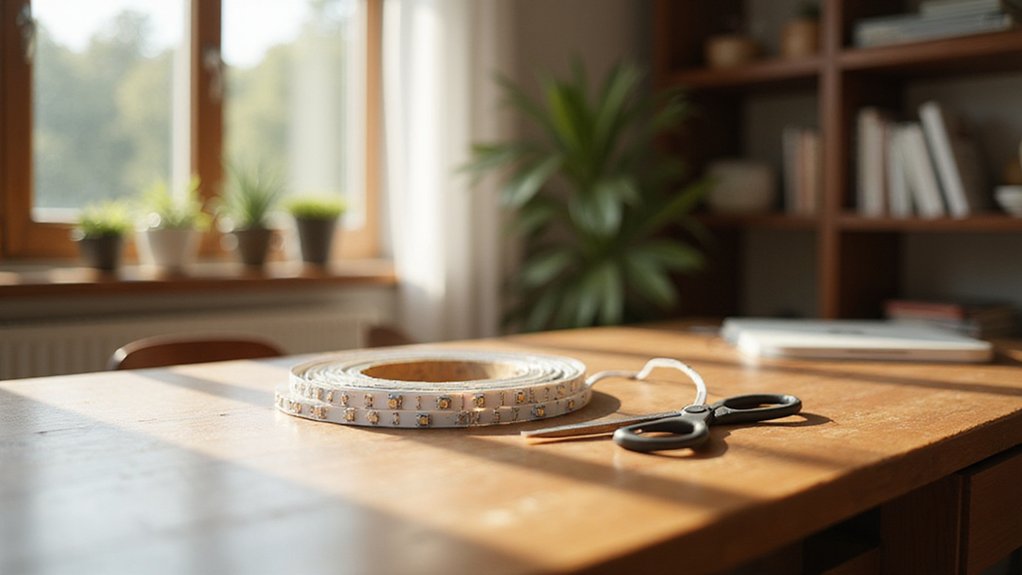
Thinking about installing LED strip lights but feeling unsure where to start? You’ll want to measure your space carefully and plan for extra length to avoid surprises.
With some simple steps like choosing the right wiring and preparing surfaces properly, you can create a clean, professional-looking setup.
Keep reading to learn how to make your DIY project both easy and long-lasting.
Measure Your Space and Strip Needs First
Measure your space and strip needs first to ensure a perfect fit. Use a tape measure to note the length of each wall or surface where you plan to install the LED strip. For rectangular rooms, add the length of all four walls and double the total to get the perimeter. If your room has an L-shape or alcoves, measure each section individually to capture every nook accurately.
Account for obstacles like doors, windows, and cabinets, which break up the continuous run. Measure the sections around these features separately, and mark where strips will need to bend or turn corners. Drawing a rough sketch of your layout helps you visualize the route and spot tight curves. To accommodate installation errors and complex layouts, add an extra 10% to 20% to your total measurement. Don’t forget to prepare flexible connectors for 90-degree turns, which facilitate smooth bends without damaging the strip. If you notice any flickering after installation, it is often caused by incompatible dimmers rather than the strip itself. Using a squeegee to smooth the strip against the surface can help avoid air bubbles and ensure full adhesion. Proper planning now means your LED strip will fit seamlessly and avoid costly mistakes later. For best results, choose LED strips with high brightness and reliable performance, as reviewed in top light comparisons.

【Compatible Lights】This installation accessories set is ONLY compatible with 8mm width 2-Pin COB LED Strip lights(Not applicable to 10 mm board width and CCT Tunable COB LED Strip Lights).The strip to wire transparent connector allows you to easily connect a COB strip to another COB strip with wire without soldering

Connector Type: L-Shape connector for corner or turning connection
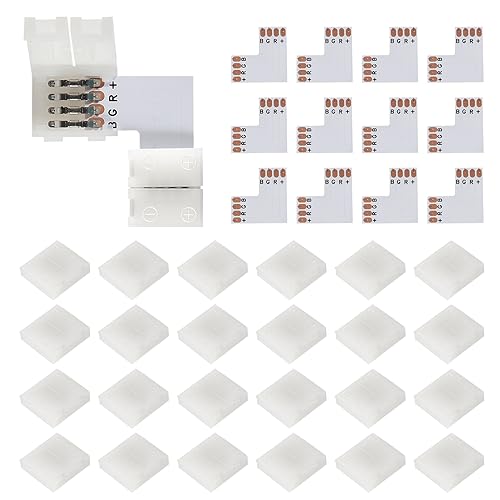
L-shape flexible LED strip connector 10mm wide, 90 degree, clip-on connection, connects two RGB 5050 flexible strips and strip segments. Makes the connection easy and fast, especially when doing LED strip projects, saves more time
Avoid Voltage Drop by Planning Runs Correctly
To prevent voltage drop, plan your runs carefully by dividing long sections into shorter segments. For 12V LED strips, keep each segment under 5 meters; for 24V strips, stay below 10 meters. Using parallel feeds helps distribute power evenly. For example, if you have a 30-meter run, break it into six 5-meter sections fed from one side. Installing the power supply in the middle of the strip can also reduce voltage drop by creating two shorter runs. Similarly, planning your runs with a centered power supply can improve stability, just as placing a curtain rod’s bracket at the midpoint reduces sag. You can also apply this approach by using a clean surface to ensure your adhesive backing sticks firmly during installation. For consistent results across multiple strips, consider using a top smart bulb to wirelessly coordinate brightness levels with your LED system.
Implement power injection points along the strip by connecting wires at multiple spots—both ends and periodically if needed—to maintain voltage stability. Always choose a thicker wire gauge, meaning a lower AWG number, based on your total current draw, to minimize resistance. For longer distances, switching to a 24V system provides better voltage stability. Lastly, position the power supply close to the start of your run to ensure consistent brightness and prevent dimming at the far end.
Clean and Prep the Surface for Strong Adhesion
To ensure optimal adhesion, start by thoroughly cleaning and prepping the surface. Use isopropyl alcohol (IPA) at 70% concentration or higher on a lint-free cloth to remove dust, grime, and oils. For glossy or non-porous surfaces like painted wood or metal, lightly scuff them with fine-grit sandpaper before wiping again with IPA to eliminate debris. Proper cleaning and scuffing significantly improve the bond strength. For those transitioning from other lighting projects, consider that similar surface preparation steps apply when you convert can light to pendant fixtures for reliable installation. Similarly, just as removing window film requires careful residue elimination, wiping away all dust after sanding prevents adhesion issues.
Make sure the surface is completely dry after cleaning—wait 1 to 2 minutes for the IPA to evaporate fully. Avoid using methylated spirits or acetone, as these can leave harmful residues that weaken adhesion. Lastly, verify that the surface temperature is above 15°C (60°F); if it’s colder, use a hair dryer to pre-warm it. Just as weighing style and function helps you decide between a vanity and a desk, meticulous surface preparation ensures your LED strips stay firmly in place. Proper surface prep is key to ensuring your LED strips stay firmly in place.
Where to Cut LED Strips (and Where Not To)
You should only cut LED strips at the designated cut points, which are marked by small scissors icons and lines running through the copper pads. These marks appear every three LEDs on a 12V strip because each LED runs at approximately 4 volts. Always cut exactly along these lines to keep your strip fully functional. This approach is similar to how window film allows you to see out but not in, relying on precise marks for proper operation. For a reliable result, treat these cut points like the can light conversion kit connection points that require exact alignment.
Never cut between these marks or anywhere else; doing so will break the circuit and make the remaining segment unusable. When preparing to cut, disconnect power first for safety. Use sharp scissors to make a clean cut through the center of the copper pads at the designated mark. This not only preserves electrical integrity but also makes soldering easier later on.
Each cut point is aligned with the +5V, G (Ground), R (Red), and B (Blue) pads. Precise alignment ensures that your segment will work properly after cutting. Avoid cutting within a group of three LEDs, as they are electrically linked. Cutting in the wrong place wastes material and ruins connections, forcing you to discard the damaged segment. Follow these instructions carefully to maintain the functionality of your LED strips and prevent frustrating mistakes.

SMD 5050 LED Rope Lights: There are RGB color leds on 16.4ft flexible PCB board. You can control the rgb led tape color like as red/ green/ blue/ white/ purple/ yellow/ pink/ orange and colorful. (All you can search "SUPERNIGHT RGB remote controller" )

16-in-1 All-Purpose Electrical Tool: Combines wire stripping, cutting, twisting, crimping, clamping, wrench work, sheath splitting, and voltage testing in one compact plier. Handles 80% of daily wiring and repair tasks without switching tools

WHAT YOU'LL NEED: You will need a 12 volts Power Supply to light up your lights, or choose a dimmable driver and wire lead connector for customizing your personalized lighting projects. (They are sold separately)
Connect Strip Sections With Clips or Solder
To connect strip sections, you can choose between connector clips or soldering, depending on whether you prefer a quick, tool-free method or a permanent connection. For connector clips, push the strip ends into the clip, making sure the negative contacts align with negative and positive with positive. Lock the clip shut, and the connection is complete. These clips are especially handy around corners when used with a corner connector, providing a secure and easy-to-install link. For achieving a better quality connection, ensure the clip contacts are firmly pressed against the copper pads to avoid flickering. For a truly durable setup, consider using closet shelves with clips that offer both stability and easy access.
For a more permanent bond, soldering is the way to go. Start by cutting the strip slightly to the right of the marked line to expose more copper. Then, solder a blob onto each pad, ensuring the copper contacts remain separate—such as blue from red—to prevent shorts. Once soldered, slide heat shrink tubing over the joint for insulation and protection. For a 90° corner, attach wires to create an L-shaped angle with enough slack to allow flexibility. Proper alignment is crucial: match the same color contacts (green to green, red to red) and keep both strips oriented in the same direction. This prevents burnout and guarantees a reliable, lasting connection. After finishing, use a multimeter to test for continuity and confirm no shorts exist.

Wide Compatibility: These LED light strip connectors are suitable for 4 pin 8mm (0.31in) wide SMD 2835/3528/5050 RGB LED flexible light strips, whether they are waterproof or non-waterproof

Working condition: our LED light strip connectors are able to stand up to 4 ampere current and 0 - 24V (5V, 12V, 24V) voltage, the heat resistance level is -20℃ - 100℃, so they are suitable for most non-waterproof 4 pin SMD 5050 RGB lights in 0.39 inch/ 10 mm width, and you should pay attention to use them correctly for ensuring safety and extending service life

【Compatible Lights】This installation accessories set is ONLY compatible with 8mm width COB LED Strip lights(Not applicable to 10 mm board width and CCT Tunable COB LED Strip Lights).The strip to wire transparent connector allows you to easily connect a COB strip to another COB strip with wire without soldering
Wire Polarity and Controller Setup the Right Way
When wiring your LED strip lights, it is crucial to get the polarity correct from the start to prevent damage or malfunction. Use the PCB markings to identify polarity: “+” or “V+” for positive connections, “-” or “GND” for negative. Red wires generally indicate positive voltage, while black or white wires indicate negative or ground. To verify polarity safely, use a multimeter set to DC voltage mode—touch the red probe to the terminal marked V+ or positive, and a positive reading confirms correct polarity. Ensure red wires connect to the controller’s V+ output and black wires to GND or negative terminal. For RGB LED strips, five connections are necessary: positive (+), red, green, blue, and often a common ground or positive line, depending on the strip type. Be sure the V+ line is securely inserted into the V+ terminal, as a loose connection can cause issues. Mismatched polarity will prevent the LEDs from lighting or could cause permanent damage to the strip or controller. Always double-check your connections before securing them with connectors or tape. Taking the time to confirm polarity upfront saves you from troubleshooting headaches later. Connectors like the Pig T or splice types require ensuring red wires match positive and black match negative for reliable, solderless contact. This careful approach is similar to folding pants on hangers in that both require precise alignment for a secure and lasting result. Additionally, organizing your wiring components in a labeled storage bin, much like sorting hardware for a closet system, helps prevent errors during setup. Using a multimeter to test for correct voltage output before finalizing connections provides additional safety and confirmation.

Support LED Strip:3pin WS2812B WS2811 SK6812 SK6812RGBW WS2814 CCT RGBIC Addressable Chasing Color SMD LED Strip Light 10mm 0.39in Width

Only for 8mm wide single color white led strips. Installation notes:1.Ensure metal in connector touches light strip; 2.Ensure the connection is correct with positive to positive.

Support LED Strip:5050 SMD 5pin RGBW LED Strip Light 12mm 0.47in Width.Note: CAN NOT work with FCOB RGBW LED Strip Light.
Test Everything Before You Stick It Down
To ensure your LED strip functions perfectly before mounting, testing everything thoroughly is essential. Start by verifying that your power supply’s voltage matches the strip’s requirements using a multimeter. After connecting the power supply to the wall socket, measure the output voltage at the positive and negative terminals to ensure it reads 24V DC. Check for correct polarity and confirm stable voltage at both ends of the strip to prevent voltage drops. For individual segments, use diode test mode to identify faulty LEDs—replace any that show no glow. This process mirrors the careful consideration of style, cost, and function when choosing between a lamp and a table for your space. When selecting a ceiling light, it is similarly important to match the fixture to the room’s specific purpose and layout.
Next, perform a remote test by briefly powering the strip while it’s unmounted. This confirms full functionality before applying adhesive. Use your multimeter’s continuity setting to check all solder joints and connectors. Listen for a steady beep; if it’s absent, the circuit may be broken. Don’t overlook this step, as loose wires or poor connections often cause intermittent failures. Testing now can save you from peeling up a dead strip later and simplifies troubleshooting if issues arise during installation. Similarly, verifying accurate measurements ensures a perfect fit when installing roman shades.
Mount Strips for a Clean, Secure Finish
Once your strip has been fully tested and any issues addressed, you can proceed to mount it for a clean, secure finish. Begin with surface preparation by cleaning the area with isopropyl alcohol to remove grease and dust. Lightly sanding painted or glossy surfaces helps improve adhesion. Ensure the temperature is above 15°C, as lower temperatures can compromise the bonding process.
For rough or porous materials like concrete or raw wood, avoid tape; instead, use mounting channels. These aluminum channels provide a sleek, professional appearance and protect your LEDs from damage, while also providing heat dissipation to extend the lifespan of the strip. Mount the channel first with screws, then slide the LED strip into the smooth base of the channel.
When mounting the strip, avoid pressing directly on individual LEDs, which can damage them or cause uneven placement. Instead, apply firm pressure along the length of the strip, holding each section for about 10 to 15 seconds. Work gradually from one end to the other, peeling only about two inches of backing paper at a time. This technique helps maintain straight alignment and ensures a secure, long-lasting installation.

PACKING INCLUDING: Pack of Ten(10) 1m/3.3ft long segments with Cover. Includes 24pcs end caps(12pcs without hole and 12pcs with hole), 24pcs mounting clips, and 48pcs screws(24pcs for woodiness ,24pcs for ceiling) for easy installation, 2pcs extension connector and 1pcs L-shape corner . The channels can be cut down to any length. Please search B07886RKNV If need extra mounting clips and end caps. LED strips not including.

Classic Style - U1SW is a regular LED strip channel with 0.5" inner width and 0.25" height. It fits most light strips with width less than 12mm, such as 3528, 5050, 5630, 2835, etc. Silver channel with milky white cover has an elegant look and slim design, providing a neat and high-end lighting effect

Mounting Clips: Includes 3 mounting clips for 1 channel and 2 corner connectors for 10 channels
Fix Common Strip Light Mistakes After Installation
If your LED strip lights are flickering or have dim spots, you likely need to address grounding issues. Ensure the strip’s negative terminal is connected directly to the power supply’s ground terminal, rather than sharing it with high-load devices. Proper grounding helps prevent voltage instability and flickering. Water ingress near connections can cause electrode corrosion, which degrades conductivity over time. Seal any exposed solder pads and connectors with silicone sealant or heat shrink tubing to keep moisture out. For adhesion problems, clean the mounting surface with isopropyl alcohol and press the strip firmly for at least 15 seconds. Persistent voltage drops can often be fixed by upgrading to a power supply with at least a 20 percent higher wattage rating to provide a buffer—this prevents under-voltage issues. Lastly, sharp bends can break internal wires; instead, use flexible connectors designed for corners and curves to avoid internal damage and ensure consistent illumination. Using aluminum channels with diffusers actively aids heat dissipation while concealing the LEDs for a clean, professional look.