If your LED light strip isn’t working properly, the cause could be a simple fix or a more involved repair. Usually, the problem relates to power issues, damaged sections, or faulty components.
By understanding how to test and troubleshoot these areas, you can often restore your strip to full brightness without needing a replacement.
Here’s how to pinpoint and fix common LED strip problems.
Diagnose Your LED Strip’s Symptoms First
Diagnosing your LED strip begins with observing its symptoms. Flickering lights typically indicate loose connections or voltage instability. Look for sections that are darkened or completely unlit, as these point to burned-out LEDs or broken traces on the strip. Color inconsistency across the strip often signals damaged components or poor solder joints. If entire sections fail to light up, it suggests interrupted current flow or defective drivers. Additionally, inspect the strip for physical damage such as cuts, bends, or burnt components on the surface. Notice whether the issue is isolated to specific segments or affects the entire strip. A burnt smell near the power input can also be a key indicator of internal damage. When selecting a replacement strip, consider the functional fit of your chosen lighting to the storage area, just as you would weigh style and cost when choosing between a shoe rack and other storage options. Check also whether the flickering is caused by voltage instability from an incompatible dimmer switch. Recognizing these patterns early helps focus your repair efforts on the actual cause, saving time and effort. Once you’ve documented the symptoms, you can proceed confidently to troubleshooting, but avoid checking the power supply until later. Focus first on what you can visually observe. Before applying emotional energy to a glamorous vanity or a practical desk setup, remember that even a perfect fit requires proper lighting function.
Check the Power Supply and Voltage Match
To ensure proper operation, verify that your power supply matches the voltage rating of your LED strip. Locate the printed voltage rating on the strip’s circuit board, such as 12V or 24V, and confirm your power supply provides the exact voltage. A mismatch can cause flickering or permanently damage the LEDs. Use a multimeter to measure the actual DC voltage at the strip’s input contacts while the strip is powered on — the voltage should match the rating precisely. Additionally, for outdoor installations, consider the IP rating of the power supply to ensure adequate weather protection. It is also wise to position the power supply in a well-ventilated area to prevent overheating during extended use. For indoor use, a single cell shade offers a lighter weight and lower cost than a double cell option. To further organize your workspace, consider using a bedside table to keep tools and components within easy reach during installation.
Next, calculate the total wattage needed by multiplying the wattage-per-meter specified on the strip by the installed length. Add a safety margin of 20 to 30 percent to account for potential voltage drops and future expansion. Apply the 80 percent rule: multiply the total wattage by 1.25 to determine the minimum power supply capacity. Always select a constant voltage driver designed specifically for LED strips, avoiding variable or AC outputs.
Make sure the power supply’s amperage rating meets or exceeds your strip’s current draw to prevent voltage drops that can cause flickering or damage. Finally, check for certifications like UL or CE to ensure your power supply’s reliability and safety before making the final connection.
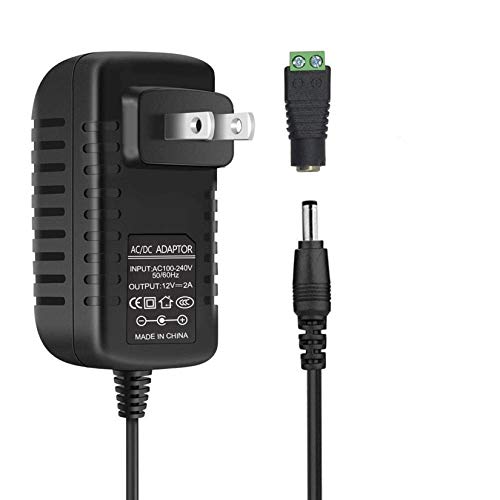
[INPUT&OUTPUT] 12V 2A power supply, 100-240V AC input, 50/60Hz, DC 12V 2A output, 24 Watt (24W) maximum power output

Important Note: 1. Before purchasing, please check whether the working voltage of your device is 12V and the current is not greater than 5A; Please do not use for 5V 9V 19V 20V 24V 36V devices and other devices require lower or higher working voltage than 12 volts 2. Check whether the DC connector is the same size as the product

DC 12 volt LED Power Supply: Input: 90-265V AC 0.85A 50/60HZ, Output: 12V DC 2.5A 30W. Converts AC 110V/120V to DC 12V, 3.3 feet power cord with US standard 3-prong plug. Low power consumption, high efficiency stability of the 12V 30W LED driver
Cut Out and Replace a Dead Section
To replace a dead section on your LED strip, start by cutting out the faulty segment along the marked cut line or where the copper pads are indicated. Unplug the power supply first to ensure safety. Look for signs of damage such as burn marks or black spots to identify the dead section. Use sharp scissors to cut directly on the line, making sure to preserve the copper pads on the working sections.
Remove the damaged piece completely. Next, obtain a compatible replacement strip of the same voltage and cut it at its designated cut points. Use a quick connector to join the new segment: open the connector, align the copper pads with the contacts, and close it firmly. For a secure connection, use parallel jaw pliers to squeeze the connector closed. Repeat for the other end, maintaining correct polarity. Precise cutting along the marked lines is essential to ensure the copper pads remain intact for reliable electrical contact. As with choosing a chest of drawers over a dresser, selecting the correct connector type is crucial for lasting functionality. Ensuring you have the proper tools like a wire stripper and soldering iron can also improve connection reliability.
Power the strip on to test whether the repair was successful. Uniform lighting indicates a good connection. If the colors do not appear correct, double-check the polarity and perform any necessary color correction. To finish, secure the repaired section with mounting clips to prevent movement or damage. This approach allows you to fix your LED strip without replacing the entire unit.
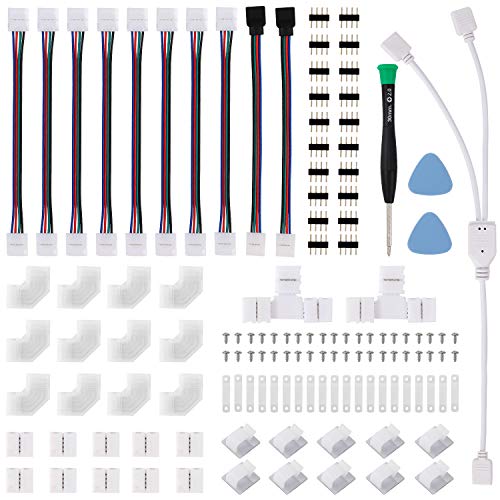
💙Upgraded Connectors & Clips - We upgraded the L shape connectors from normal to solid and unbroken ones for different corners. And the mounting clips are also upgraded to two-end frosted styles, which is strong and good looking.
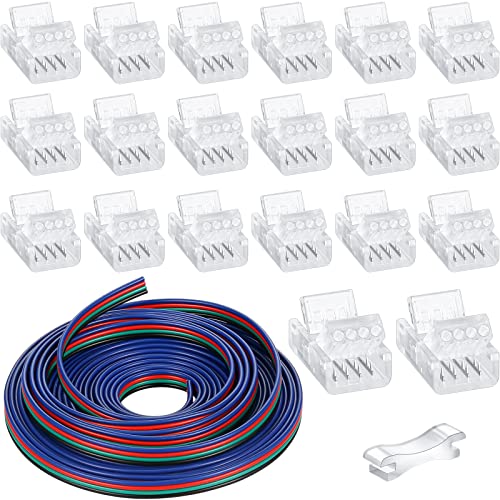
A Good Combination: the package comes with 1 piece of 16.4ft light strip cable, 20 pieces of transparent LED strip connectors and 1 piece of connector pry, useful and practical, enough to satisfy your connection needs

【Ultra-Easy, Solderless Installation for 10mm RGB 5050 LED Strips】 Say goodbye to messy soldering! These 4 pin LED strip connectors are designed for effortless, tool-free installation. Simply align your 0.39” (10mm) wide 2835/3528/5050 RGB flexible LED strips, snap the clip, and you’re done. Perfect for both waterproof and non-waterproof strips, it’s the easiest way to create a stable, gapless connection in seconds—no technical skills required.
Reinforce Weak Connections With Solder
To reinforce weak connections, you’ll solder the wires directly to the LED strip’s copper pads to create a durable, low-resistance joint. Start by cleaning the pads with isopropyl alcohol to remove any oxidation or dirt that can impair solder flow. Apply flux to both the pad and the wire ends to help the solder flow smoothly and ensure a strong connection.
Use proper soldering techniques: first, heat the pad for about one second with the soldering iron, then touch solder directly to the pad—avoid applying solder to the iron tip. Tin your wires by holding solder against their ends for 1 to 2 seconds until they are coated with a thin layer of solder. Position the tinned wire on the prepared pad, then apply the soldering iron to both the wire and the pad simultaneously for 2 to 3 seconds, ensuring good heat transfer. Using an adjustable temperature model soldering iron allows you to set the ideal heat for reliable connections. When choosing your window covering, cellular shades provide excellent insulation compared to standard blinds. For a project that requires a stable workspace, consider a queen bed with storage to keep your tools and supplies organized. To achieve precise alignment, curtain hooks must be spaced evenly along the mounting track.
Hold the wire steady for about five seconds after removing the iron to prevent cold joints, which appear dull or grainy and are mechanically weak. Inspect each joint carefully; it should look shiny, smooth, and slightly concave. Any dull or rough joints should be reheated and reworked. Finally, slide heat shrink tubing over the soldered joint and use a heat gun or lighter to shrink it, providing mechanical protection and insulation.

【UPGRADE SOLDERING IRON】The 100W soldering iron uses a high-power, advanced plug-in ceramic heating core that heats up quickly in 15 seconds, allowing you to work faster. Its temperature calibration function also ensures accurate and reliable temperature control. The pen-style iron is also portable and easy to carry.

【Professional Function Design】This 60w 110v pencil-type soldering iron features adjustable temperatures(392 ℉-842 ℉/200-450 ℃) and thermostatic setting. In addition, our soldering iron with ON/OFF Switch, which is easy to save energy and ensure safe welding.

【High Efficiency and Safety】The soldering iron has an on/off key for energy saving and safe soldering, it is a 110V 60W adjustable temperature electric soldering iron, which heats up faster. Six air vents extend the life of the soldering iron and effectively prevent the soldering iron from overheating.
Fix Voltage Drop in Long Strips
To fix voltage drop in long LED strip runs, you need to improve how you distribute power. Relying on a single feed point isn’t enough because resistance increases with distance, causing dimming at the far end. To counter this, inject power into multiple points along the strip instead of just one. For example, split a 30-meter run into three segments of 10 meters each and power each segment from both ends. This helps maintain consistent brightness throughout the entire strip. Long runs of LED strips experience voltage reductions and decreased light output, especially when exceeding recommended lengths.
Using thicker wire gauges makes a big difference. Instead of common 18 AWG wiring, opt for 14 or 12 AWG cables, which have lower resistance. Calculate your total current — watts divided by volts — and add at least 20% as headroom to choose the right wire size. Aim for a voltage drop of no more than 3–5%. Placing your power supply in the middle of the run reduces the distance current needs to travel, improving voltage stability. For longer runs, switching to 24V LED strips helps because they halve the current needed, thereby reducing voltage drop effects.

SPECIFICATIONS: The wire has an overall diameter of 8.5mm/0.335 inches, and 67 strands of 0.2 mm of copper-clad aluminum(CCA)constitute.are inside each circuit, has lower resistance and higher conductivity

【14-22AWG Large Wire Connector】Our innovative push in design can firmly clamp 14-22AWG wires without any peeling or welding. Simply plug in the wire and connect it securely immediately, saving you time. Please note that in order to complete the wiring, you will need two connectors to be docked and inserted.

SPECIFICATIONS: 14 gauge wire contains 41 strands of 0.24mm Copper Clad Aluminum per circuit, offering superior conductivity and stability. With up to 5% more current capacity than aluminum, it ensures reliable, interference-free performance
Test Diodes and Resistors With a Multimeter
To test diodes and resistors with a multimeter, follow specific procedures to determine if each component functions properly. For diode testing, set your multimeter to the diode symbol. Connect the black probe to the cathode—usually marked with a flat side—and the red probe to the anode. If the diode is good, it will show a forward voltage drop around 1.6 volts, and the LED may light up briefly. Reversing the leads to check for no lighting if the LED is good confirms the LED is functional. Reverse the probes; in a functioning diode, you should now see OL (over limit). If you get OL in both directions, the diode is burned out. Conversely, readings in both directions indicate the diode is shorted and faulty.
When testing resistors, always remove the resistor from the circuit first to avoid interference. Set your multimeter to the ohms (Ω) setting. Touch each probe to a resistor lead, and record the reading. Compare this number to the resistor’s color code or specified value. If the measurement is significantly off or shows OL, the resistor is defective. Before testing, ensure that power is completely off to prevent damage to the multimeter and ensure accurate readings.
Bypass a Faulty Controller to Test the Strip
To bypass a faulty controller for testing the strip, start by confirming the controller is the issue rather than the power supply or the strip itself. Open the controller casing and inspect for burnt components, signs of water damage, or any audible pops. If these are present, the controller is likely faulty. For standard RGB LED strips, perform a simple bypass: disconnect the controller, then connect the red wire directly to the positive terminal and the black wire to the negative terminal on your power supply. To achieve full white light, connect the red, green, and blue negative wires together all to the negative terminal. This method strips away the color control function, resulting in static white light. Keep in mind that addressable strips like WS2812 require a controller for data signals and cannot be bypassed for effects. In such cases, you will need a manual switch to control power without involving the controller. Capacitors within drivers commonly bulge and fail, affecting driver operation. Regular dust buildup on mini blinds can be effectively cleaned with a microfiber cloth and mild soapy water. Before testing any bypass, always ensure the power supply is disconnected for safety, as outlined in standard light fixture replacement guides. For a more durable alternative, consider HID bulbs which offer higher lumen output and longer lifespan than many standard LEDs.
Replace the Strip When Repairs Fail
If repairs fail, replacing the faulty section of your LED strip is necessary. Identify urgent issues such as darkened areas, a burnt smell, or voltage drops along longer segments, as these indicate irreversible damage. Remove the damaged portion by cutting along the designated scissor lines with sharp scissors or a utility knife. Ensure the new segment matches the original voltage and type to maintain compatibility. You may choose a different color option if you want a refreshed look. Connect the new strip using strip-to-strip connectors or solder the joints, making sure the copper pads align properly. Power on immediately after installation to test if the repair was successful. Always verify the correct polarity and secure all connections firmly to prevent future issues. If the voltage and lighting are not restored after replacing the segment, you should replace the entire LED strip. Attempting further patchwork can cause overheating and potential damage. To isolate the issue, cycle through all available colors to locate where the faulty section appears. Before cutting, clean the surface thoroughly to prevent adhesive failure and ensure a secure bond. For outdoor placements, follow the same weatherproofing guidelines used when hanging fairy lights to protect the connectors from moisture.
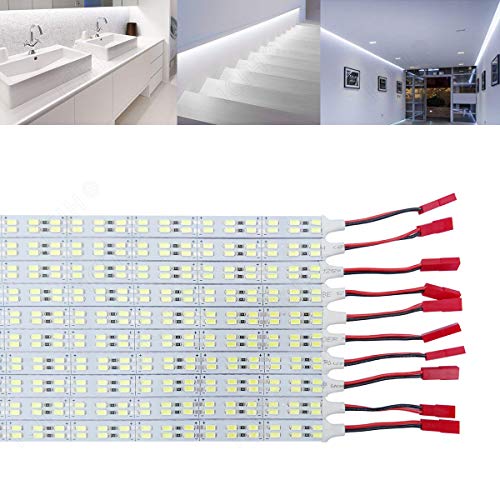
Suitable DIY LED Lights: Every 6 LEDs as an unit,which is cuttable along the cutting marks according to actual requirement.Extra wire connectors(5pcs Male+5pcs Female) are provided for solving the lights’ linking issue.ICIH rigid led strips work in DC 12V low voltage,It’s low heat and safety to touch.Great idea to upgrade your Kitchen Cabinet,Counter,Showcase,Booking Shelf,TV Back,Cupboard,etc.
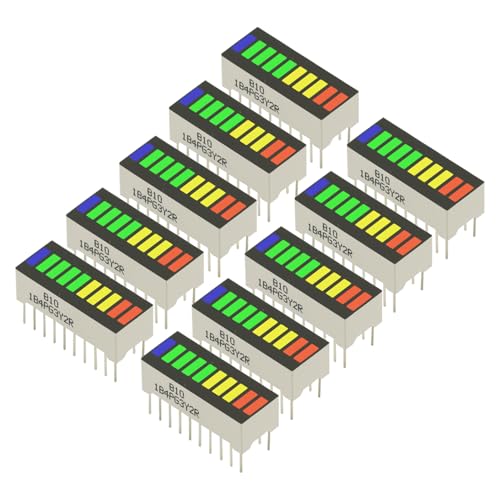
10PCS LED Display 10 Segment Bargraph Light Display Module Bar Graph Ultra Bright Red Yellow Green Blue Colors Multi-color

BRIGHT 12V BLUE ILLUMINATION: Powered by 12 SMD 5050 3-chip LEDs per strip. Delivers 95 lm/W brightness with a wide 120-degree light beam angle.