Having trouble wiring a new dimmer switch? If you’re unsure where to start or worried about safety, you’re not alone.
Connecting a dimmer properly ensures smooth operation and avoids flickering or electrical issues.
Once you understand the basic steps, you’ll be able to upgrade your lighting with confidence.
Here’s what you need to know to get it done safely and correctly.
Turn Off the Power and Confirm It’s Really Off
Turn off the power completely and verify it’s really off before working on the wiring. Start by locating your main electrical panel and flipping the breaker that controls the circuit for the dimmer switch to the “OFF” position. Use a non-contact voltage tester to confirm there is no voltage present. Hover the tester’s tip near each wire inside the wallbox without touching the metal. If the tester alarms or shows a light, voltage is still present, and the power isn’t fully off. Repeat this process on all exposed wires—hot, load, and ground—to ensure none carry voltage. Securing the breaker with a lock or tag and informing household members that it’s disabled prevents accidental re-energizing. Only proceed with your work once you have confirmed that the power has been completely shut off. When choosing a workspace, a desk versus vanity depends on whether you prioritize daily functionality or styling and makeup storage. This reset procedure is designed to resolve malfunctioning behavior if the dimmer later becomes unresponsive or erratic. If the dimmer does flicker after installation, it may be caused by incompatible LED bulbs or a lack of a neutral wire. For a more reliable result, consider using tungsten bulbs if your dimmer is older and not designed for LED loads.
Remove the Old Switch and Tag the Wires
After confirming the power is off, remove the old switch and tag the wires to keep connections clear. Start by unscrewing the faceplate and mounting screws, then carefully pull the switch out of the wall box without disconnecting anything. Focus on wire identification by locating the black wire attached to the different-colored screw—this is your hot wire. Use electrical tape to mark that wire for the new dimmer’s black lead. If two wires share the same screw, tape them together to keep them connected. Note any red or red/white wires for their respective terminals. Finally, clip the wires flush with the old switch terminals and strip about half an inch of insulation from each end to prepare for the next steps. Always use a circuit tester to verify power is off before handling any wires, as this critical safety precaution prevents electrical shock. Just as proper bracket placement ensures your curtain rod is level and secure, correctly aligning each wire tag prevents misconnection during installation. For optimal lighting results after installation, consider pairing your dimmer with fixtures that offer superior brightness levels for evening visibility.
Ground Your Lutron Dimmer to the Wallbox Wire
To ground your Lutron dimmer to the wallbox, start by locating the house ground wire, which is either bare copper or insulated with green. If the wire is too short, extend it by pulling out more wire from the wallbox and re-ground the metal box to ensure safety. Twist the dimmer’s green wire tightly around the house ground wire, then secure both with a wire nut. Make sure no bare copper is exposed and that the connection does not touch any live wires. Before working on any electrical wiring, always turn off the power at the circuit breaker for safety. Proper grounding is essential, as it protects you from electrical faults and prevents LED flickering. Without a proper ground, the dimmer can operate unsafely, so do not skip this step—even if the previous switch had no ground connection. A properly grounded dimmer ensures safe lighting for a DIY clothing rack setup at a garage sale. For optimal performance, use the range lever to adjust the low end and stop any flickering after grounding. Always check the wire nut to confirm it is fastened tightly for a secure connection, as recommended in guides for curtain hooks.

WHEN RELIABILITY MATTERS: The Lutron Smart Hub works without Wi-Fi, providing ultra-fast, reliable performance beyond a typical wifi switch for dependable smart lighting

ADD A SWITCH TO YOUR LAMPS: Avoid walking through a dark room to turn your lamps on or off. Simply plug the lamp into the lamp dimmer/switch and put the Pico remote at the entrance of the room. Perfect for bedrooms with nightstand lamps or living rooms that have lamps
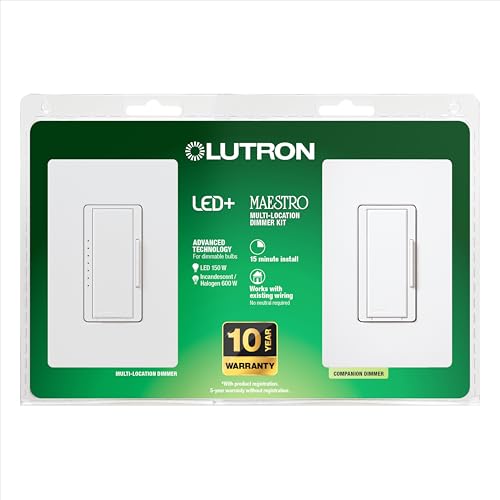
MULTI-LOCATION DIMMING: Have full dimming control from every location in a 3-way using the included companion dimmer. Additional companion dimmers can be used for 3 or more locations.
Wire Your Lutron Dimmer for Single-Pole Setup
Once you’ve grounded the dimmer, wire it for a single-pole setup by connecting the black dimmer wire to the tagged wire from the old switch or to either of the wall wires. If two wires from the wall are taped together, attach both to the black dimmer lead. Then, connect the red dimmer wire to the remaining wall wire. For screw terminal connections, loop the wires clockwise around the bottom two screws to ensure a solid hold. Before proceeding, verify that your dimmer is compatible with your bulb type, as incorrect pairing can cause flickering during operation. If you plan to integrate smart controls later, also check that the dimmer supports wireless connectivity. Cap the red/white dimmer wire, which is unused in this setup, with a wire connector. Make sure all leads are securely insulated and that no wires cross with active wires. The blue trim wheel adjusts dimmer low/high end and flickering for fine-tuning. Finally, carefully fold the wires into the wallbox, ensuring there is enough space without overcrowding. For a creative comparison, building a DIY lava lamp with oil and water demonstrates similar principles of density and heat interaction. For precise installation, always verify the LED strip voltage rating to avoid underpowering the lights.

ADD A NEW SWITCH ANYWHERE: Add a new switch location anywhere in under 15 minutes. Simply replace the existing light switch with the Caseta dimmer and mount the Pico remote anywhere you'd like to control the lights. Pico fits in a standard wallplate to blend in with other switches

WHEN QUALITY MATTERS: For flicker-free dimming, the Lutron Ariadni dimmer switch is continuously tested with today's LEDs for flicker-free dimming. Visit Lutron's LED compatibility tool to find the LED bulbs perform the best

A dimmer light switch tested on 1,000s of bulbs and dozens of brands for flicker-free dimming
Cap Extra Red/White Wires on Single-Pole Models
On a single-pole model, you’ll cap the red/white striped wire since it’s only used in 3-way switching setups. Always turn off power at the circuit breaker before starting any electrical work. This wire is distinct from the solid red wire, which connects to your load, and is unnecessary in a single-pole configuration. To cap it, twist a wire nut onto the wire and push it deep into the wallbox to prevent shorts. Remember, do not connect this capped wire to hot, neutral, or ground terminals. A three-way dimmer switch requires this wire for communication between multiple switches. If your dimmer stops working after capping, double-check your black (hot) wire and solid red (load) connection. Properly capping the red/white striped wire ensures safe operation and reduces the risk of electrical issues. For a budget-friendly alternative, consider using a wooden drying rack for your laundry instead of relying on electrical components.

Packaging Includes - 100 pcs red wire connectors are made of premium-quality nylon shells and metal springs enhance safety and insulation.

Packaging Includes - 70PCS red wire connectors made of high - quality nylon shells and steel springs, greatly enhancing safety and insulation.

⚡Durable Insulation Material:These wire connectors are made with a thick nylon shell and strong internal metal spring. The tough thermoplastic housing provides excellent insulation, high hardness, and resistance to aging. It helps maintain a stable electrical connection and reduces the risk of loose wiring.
Mount the Dimmer and Restore Power Safely
Once all connections are confirmed and the red/white striped wire is capped, you can proceed to mount the dimmer and restore power safely. First, verify that the dimmer is compatible with your load type and wattage to prevent issues like flickering or damage. Carefully fold the wires into the wallbox, making sure insulation isn’t pinched to avoid shorts or loose connections. Align the dimmer within the opening, insert the mounting screws, and tighten them until the device sits flush against the wall. If you need to pigtail black wires before connecting to the dimmer, do so now to ensure a secure fit. This type of ceramic window film helps block heat and UV rays without altering the natural light in your home. A sturdy changing table can provide a safe and organized surface for diaper changes in the nursery.
If you are installing multiple switches side by side, you may need to break off the side fins on the dimmer or wallplate so everything fits neatly without gaps. Attach the wallplate, ensuring it matches the wallplate size and profile to prevent wobbling or gaps. Gently tug each connected wire to verify that all connections are secure before proceeding. For a custom lighting touch, consider building LED strip lights as a budget-friendly DIY project for accent illumination.
Finally, turn the circuit breaker back on to restore power. Immediately test the dimmer by toggling it on and off to ensure it functions correctly. If the lights flicker or the dimming range isn’t smooth, adjust the dimming range lever. Once the lights operate as expected and the dimmer responds properly, turn the lights off and on again to finalize the installation.
Test Your Lutron Dimmer and Fix Basic Issues
Before declaring the installation complete, you need to test your Lutron dimmer and address any basic issues that arise. First, ensure the circuit breaker is on and inspect the Front Accessible Service Switch (FASS); verify it’s in the “ON” position. For circuit troubleshooting, confirm your wiring matches the diagrams and tighten all terminal screws securely. Use a voltage tester to check for power at the fixture—if there’s no power, the problem could be a tripped breaker or a blown fuse. Inspect the wire insulation for signs of heat damage, which can indicate a poor connection or potential safety hazard. Also, confirm that the total lamp wattage does not exceed the dimmer’s capacity to avoid overload. If dimmable bulbs are not used, the lights may flicker or shut off due to incompatibility.
If the light does not turn on, try replacing the bulbs with new, dimmable versions to rule out bulb failure. To reset the device, pull the FASS out for 10 seconds then push it back in. For a full factory reset, hold the dimmer button and push the FASS to “On” for five seconds. Continue holding the button and FASS for an additional 10 seconds until you see three flickers, indicating the reset is complete.
Adjust the Dimming Range to Stop Flickering
If flickering occurs at the low end of your dimming range, adjusting the low-end trim can resolve this issue. For Caseta Wireless dimmers, press and hold the ON and LOWER buttons for six seconds until the indicator blinks. Release the buttons, then hold the LOWER button again. Tap the RAISE button repeatedly until the lights stabilize and flickering stops. Press OFF to save the setting.
For Maestro models, press and hold the tap switch and lower button until the indicator blinks. Release both buttons, then tap RAISE or LOWER to fine-tune the dimming range until flickering ceases. Tap save to confirm your adjustment.
Older dimmer models require removing the faceplate and turning the internal adjustment dial clockwise until the lights remain steady without flickering. Always verify the flicker-free performance within the new dimming range before reinstalling the faceplate to ensure a successful correction. Compatible LED strips from the top under-cabinet options can also reduce flicker when paired with the correct dimmer.

✅【Smooth & Stable Dimming】Enjoy consistent, flicker-free dimming with full-range control. Designed to support dimmable LED, CFL, and incandescent bulbs, ensuring a reliable lighting experience.Fits rocker style wall plates.

Dim LED lights to create the perfect ambiance with the Kalide dimmer wall switch;not compatible with smart lighting fixtures

✅【Smooth & Stable Dimming】Enjoy consistent, flicker-free dimming with full-range control. Designed to support dimmable LED, CFL, and incandescent bulbs, ensuring a reliable lighting experience. Wall plate sold separately, the 2-pack includes matching wall plates.
Set the Lowest Light Level With the Tap Switch
To set the lowest light level with the tap switch, enter the low-end trim mode for your dimmer model. On a Sunnata dimmer, touch the middle of the light bar continuously for about 6 seconds until the dimmer enters trim mode. Once in low-end trim mode, slide your finger up or down the light bar to calibrate the minimum stable light level. This precise adjustment prevents flickering and optimizes performance for your LED bulbs. To save your settings, tap the Off button. This process enables fine-tuning of the LED brightness range for enhanced compatibility with various LED types. For optimal results, ensure your curtain rod placement does not cast shadows that interfere with the dimmed light output during calibration.
For a Maestro dimmer, press and hold the top switch and the lower button simultaneously until an indicator blinks. Then, use the raise or lower buttons to adjust the minimum light output until you find a stable, flicker-free setting. Confirm the adjustment by pressing the tap switch. Remember, this trim adjustment is crucial for ensuring your LED bulbs operate smoothly at the lowest light level. Keeping your tools organized in a closet organizer can make such electrical adjustments easier to manage. When choosing window treatments for the room, consider whether roller shades or solar shades best complement the lighting adjustments you have made.
Avoid These 3 Wiring Mistakes: Hot Wires, Loose Connections, Wrong Screws
Just as choosing between single and double cell cellular shades requires weighing style, cost, and function, wiring a dimmer switch demands attention to detail to avoid mistakes. Ensure you’re wiring correctly to maintain your dimmer’s flicker-free operation. First, verify which black wire is live with a multimeter. Connecting the dimmer’s black wire to a traveler screw instead of the common screw reverses the circuit’s operation, so mark the correct wire clearly to avoid confusion.
Second, prevent loose connections by twisting solid copper wires tightly before securing them in screw terminals. Stranded wire is not permitted; if you must strip insulation, do so to match the exact gauge mark. Avoid over-tightening screws, as this can damage the dimmer or the electrical box and compromise safety.
Third, use the proper screw terminals for each wire: the black screw is for the hot supply, brass screws handle traveler wires, and in a three-way switch, the blue screw connects to a traveler wire. Unused red or white wires should be capped to prevent shorts. Incorrect wiring not only violates electrical codes but also risks failure and potential hazards.

ADD A NEW SWITCH ANYWHERE: Add a new switch location anywhere in under 15 minutes. Simply replace the existing light switch with the Caseta dimmer and mount the Pico remote anywhere you'd like to control the lights. Pico fits in a standard wallplate to blend in with other switches

WHEN RELIABILITY MATTERS: The Lutron Smart Hub works without Wi-Fi, providing ultra-fast, reliable performance beyond a typical wifi switch for dependable smart lighting

WIRELESS REMOTE CONTROL: Notice: NEUTRAL WIRE IS REQUIRED! The signals of switch can transmit through walls and obstacles without line of sight. Detachable remote provides more flexibility for mounting location. With our wireless light switch and receiver kit, you can move or add a light switch — all without rewiring.